Limit order still not filled: did the price really get there, and should you edit or cancel?
Your limit order has been sitting there for ages with nothing happening. Before you decide the platform is frozen, split the problem in two: either the price fell just short of your number, or it did reach your number and your order didn't get its turn at that price. First confirm it's still listed under [Open Orders], then use the 1-minute chart to check whether the price ever actually touched your limit. Once you know which case you're in, decide whether to keep waiting, change the price, or cancel.
- First: is it still open, or has it already filled?
- Three things have to line up for a limit order to fill
- Did the price actually touch your limit? Check the 1-minute chart
- The price clearly got there, so why is it still open?
- Editing: change the price or amount, but you get a new order
- Cancelling: one order, all of them, or switch to a market order
- Two traps you can avoid when you place the order
- Can't cancel, or the funds didn't come back? Two things to have ready for support
- Questions people often ask
First: is it still open, or has it already filled?
Sometimes the order you think is stuck actually filled long ago, and you were simply looking in the wrong place. Binance keeps unfilled and filled orders in separate lists:
| What you want to see | Website | App |
|---|---|---|
| Orders still open and unfilled | [Open Orders], below the spot trading screen | [Open Orders] under [Trade] - [Spot] |
| Orders that have filled | [Trade History] | Tap the [Order Records] icon, then choose [Trade History] |
So step one is simple. If the order is still in [Open Orders], it genuinely hasn't filled, so read on. If it's no longer there, go to your trade records and see whether it has already filled.
There's one more case to tell apart: partial fills. Binance's help pages point out that when the orders on the other side only cover part of your quantity, your order may fill only in part. Binance still treats an order that hasn't completely filled as open: the remaining quantity stays in [Open Orders], and you can still change its price or amount.
Three things have to line up for a limit order to fill
A limit order is a price you post on the order book, and it only executes when the market reaches that price (or a better one). But "the price got there" is only the first requirement. Binance's Help Center uses a limit buy order as its example, and three conditions have to hold at the same time:
- The market price reaches your limit price, or goes lower. Say the current price is $2,400 and you post a buy order at $1,500. Until the price falls to $1,500 or below, nothing happens.
- There are enough orders on the other side. The price hits $1,500, but if nobody is selling at that level, your buy order still won't execute; if the sell orders there only cover part of it, only that part fills.
- There's enough time for the order to execute. In a sharp, fast market the price may only flash past your limit and move on before your order's turn comes at that price.
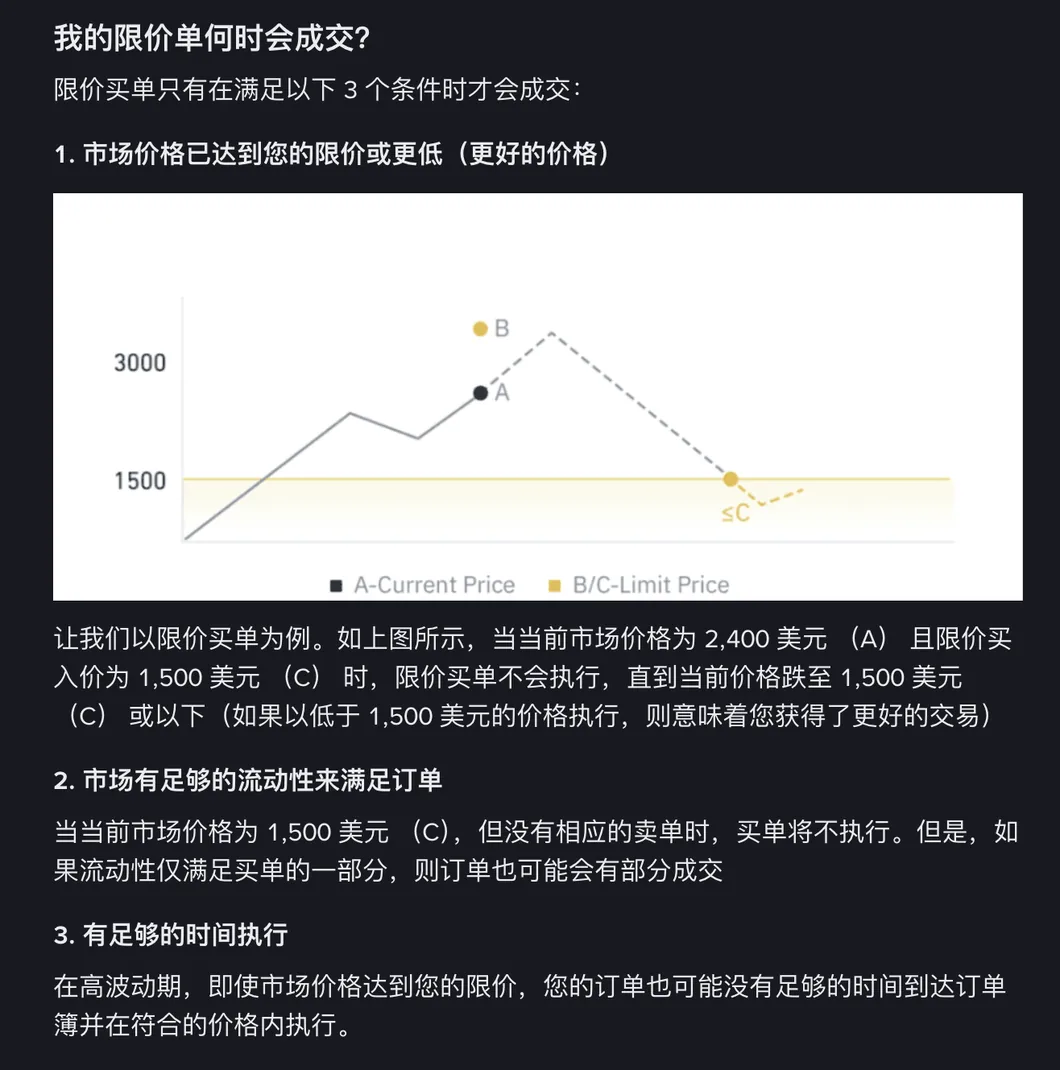
Beginners usually only think of the first one. Put the other two together and they're saying this: a posted order is waiting for someone willing to trade with you at your price. The price alone isn't enough. There has to be someone on the other side, and there has to be time.
Did the price actually touch your limit? Check the 1-minute chart
"But I saw the price get there" is the hardest thought to let go of when a posted order hasn't filled. Binance's way of checking comes in three steps:
- Go to [Trade] - [Spot] and bring up the chart for your trading pair.
- Switch the chart to [TradingView], set the time period to [1m], and make sure the time zone is set correctly.
- Find the stretch of time after you placed the order and look at where the price actually peaked (for a sell order) or bottomed out (for a buy order).
Why insist on the 1-minute chart and the right time zone? The more time a single candle covers, the more likely its high or low happened before you placed the order; only the 1-minute chart lines up with the few minutes after you placed it. With the wrong time zone, you aren't looking at the post-order stretch at all.
Binance gives an example of its own that shows this well. It's a BTC/USDT stop-limit sell order with a stop price of 70,330 USDT and a limit price of 70,600 USDT. A stop-limit order isn't the same thing as a plain limit order, but you check the price the same way. After the order was placed, BTC rose past the stop price and the order was sent to the order book. Zoom into the 1-minute chart, though, and BTC's high over that period was only 70,598 USDT, 2 USDT short of the limit, so the sell order never filled.
The price clearly got there, so why is it still open?
If the 1-minute chart shows the price just touching your limit and the order is still sitting in [Open Orders], the cause is usually the second or third condition. On another Help Center page, "How to Resolve Order Issues?", Binance adds the key point:"Orders on the order book are filled in a chronological order, so there might be other orders ahead of yours."
Think of a queue at a bakery. You and the ten people in front of you have all told the baker "one loaf at this price," but this tray only has five loaves at that price, so the first five people get them. You're further back, so you wait for the baker to bring out more at that price, and if none come out, you just keep waiting. The price reaching your number doesn't mean it's your turn.
The same page also lists rapid price swings over a short period, and too few counterparties to match your order, as reasons an order stays pending. The price pauses at your level for a moment and moves on, the orders ahead of you use up what little was on the other side, and yours is left hanging.
At this point you have three options: keep waiting, reprice the order so it's more likely to fill, or cancel it. The next two sections cover editing and cancelling.
Editing: change the price or amount, but you get a new order
Binance lets you edit a limit order that's still open (unfilled, or not completely filled). What you can change is the price and the amount. The feature only works for limit orders.
Website: in [Open Orders] below the spot trading screen, click the [Edit] icon next to the order, enter the new price and amount in the pop-up, and confirm. If you use the [TradingView] chart and have open orders displayed on it, you can also drag the order on the chart to a new price, or click it and make the change in the pop-up. The switch for editing on the chart is called [Kline Adjustment], and you'll find it under [Settings] at the top right of the trading page.
App: go to the [Trade] screen, tap [Edit] next to the order in [Open Orders] at the bottom, and enter the new price and amount in the pop-up.
One thing you really need to know: once an edit goes through, the original order is cancelled and the system creates a new order with a new order ID. It looks like a small tweak, but you've actually swapped in a different order. When you look for it in [Open Orders] afterwards, go by the new order ID.
Before you reprice, also ask yourself why you picked that price in the first place. If you're only nudging it up bit by bit because you're tired of waiting, you're better off stopping and deciding afresh whether you still want this trade at all.
Cancelling: one order, all of them, or switch to a market order
Done waiting? Cancel it.
- Website: find the order in [Open Orders] and click the bin icon next to it.
- App: in [Open Orders] under [Trade] - [Spot], tap the [Cancel] button next to the order.
The app also has a [Cancel All] button, and it cancels every open order, not just the one in front of you. If you have orders posted on several trading pairs, make sure you really want them all gone before you tap it.
After cancelling, Binance suggests two ways forward: post a new order at a more competitive price (a buy a bit higher or a sell a bit lower, closer to the current price), or just use a market order. A market order fills fast, but you don't get to set the fill price, so each type has its own cost. What's the real difference between a limit order and a market order? Get that straight before you switch.
Two traps you can avoid when you place the order
Set an absurd limit price and the system won't take it
Binance caps how far a limit price can sit from the market: on regular trading pairs it has to be between 50% and 200% of the market price (with a market price of 100 USDT, you can only enter 50 to 200 USDT), and on stablecoin pairs it's 80% to 120%. If you were hoping to post a rock-bottom bid and scoop up a bargain, anything below that range simply won't go through.
A limit buy above the current price fills at once, and not necessarily at the price you typed
Some people set a limit buy above the current price to "make sure it fills," assuming they'll pay that higher price. Binance's official example: with the current price at 2,400, a limit buy at 3,000 fills immediately, at around 2,400 rather than 3,000. Sell orders work the other way round: a limit sell set below the current price also fills immediately, at around the current price.
The fill price won't go above your limit, and in the official example it fills near the current price. The catch is that you think you've posted an order that waits, when in fact it filled instantly. Before you place the order, check which side of the current price your limit sits on: a buy below the current price or a sell above it waits on the book; the other way round, it fills straight away.
Can't cancel, or the funds didn't come back? Two things to have ready for support
If what you're facing is a cancel that won't go through, or an order that ended but the funds never landed back in your account, that's no longer about the market. Binance says technical issues like these need customer support, and asks for screenshots that show the following two things:
- Order details (capture the order's full details page);
- Any error code or message (screenshot exactly what the screen shows rather than describing it in your own words).
Questions people often ask
My limit order is still open. How should I keep an eye on it?
Check [Open Orders] every so often. If the order is still there, it is still waiting for a matching order; if it has gone, look in [Trade History] (in the app: the [Order Records] icon, then [Trade History]) to see whether it filled. If the price keeps drifting further away from your limit, step back and think about whether to reprice or cancel.
If I change my limit from 60000 to 60500, is it still the same order?
No. According to Binance, once you successfully edit an open order's price or amount, the original order is cancelled and the system creates a new order with a new order ID. So when you look for it in [Open Orders] afterwards, go by the new order ID. The edit feature also only works for limit orders.
If I set a limit buy above the current price, will it fill at the price I entered?
It won't fill at 3,000. In the official example, a limit buy at 3,000 placed when the current price is 2,400 fills immediately, at around 2,400. For a buy order, the limit means the most you are willing to pay; if there are cheaper sell orders in the market, you fill at the cheaper price first. Sell orders work the same way in reverse.
Why was the limit price I entered rejected?
First check whether the price is out of range: on regular trading pairs the limit price has to be between 50% and 200% of the market price, and on stablecoin pairs between 80% and 120%. Anything outside that range can't be posted.
Market order vs limit order
Cancelled and thinking about a market order instead? What each type costs you, worth knowing before you pick one.
Your first buy, end to end
The whole route from funding to your first order. Posting an order is just one step of it.
How much to put in first
Before the next order, the bigger question: how much money belongs in this at all.