Registering on Binance, from the official sign-up page to 2FA
Registering on Binance's website comes down to four moves: enter your email or phone, type in the 6-digit code, set a password, confirm the referral code. This guide covers those four steps and the 2FA to switch on right after; buying and funding have their own guides.
Before you register, confirm the official entry point
Registering any account is hardly hard — no different from signing up for a shopping site. But crypto has one peculiar twist: from the moment you intend to register, scammers are already watching you. Their favorite move is forging a fake site that looks identical to the official one; you fill in your email and password, and your login goes straight into their pocket.
So the true first step of registering isn't rushing to click "Register" — it's confirming you're entering through the official entry point. Two of the most grounded habits:
- Type the URL into the address bar yourself, or click through from a source you trust. Don't randomly click an ad-marked link in the search results — that's where fakes are thickest.
- Never click a stranger's "registration link" or "support will open the account for you." A legitimate platform doesn't DM you a link to register at some odd address.
Forging fake sites and fake apps of big platforms is one of the most common tricks in crypto; for what it looks like and how to spot it on the spot, we cover it in detail in the 8 crypto scams — a few minutes before you start is worth more than anything.
If you want to follow along while you do it, enter the registration page through the link below. Registration is free; get the account set up so the later steps have somewhere to land. Once inside, just follow this piece step by step — no rush to touch money.
Register on Binance (code BN5262)Disclosure: this is a referral link. If you register through it, you pay the same standard fees.
Register with email or phone?
Open the registration page and you'll usually see two options: email registration and phone registration. Both work, with no fundamental functional difference; a beginner can choose by the logic below.
Most beginners: go with email
Email registration has a few plain advantages: your email address survives when you change numbers or phones; and a dedicated email just for accounts like this makes it easy to gather platform notices in one place later. We suggest a separate email for registering, not mixed in with your everyday clutter — cleaner and safer.
Phone wins on directness
Registering with a phone number means faster code delivery and easier login. If you're more comfortable on mobile, that route is perfectly fine too. Either way, you can later bind the other method in account settings, an extra layer of protection, with no conflict.
Binance's help center lists the website sign-up as these few moves:
- Enter your email (or phone) on the registration page and click "Sign Up."
- The system sends a 6-digit verification code to your email (or phone); enter it within 30 minutes and submit. If a slider or image check pops up along the way, it's there to stop bot mass-registration; just drag along.
- Set a strong password: Binance requires at least 8 characters with at least one uppercase letter and one number. Don't use a birthday or sequential numbers, and don't reuse one from another site. Mix letters, numbers and symbols; longer is steadier.
- Near the end you confirm the referral code; more on that in the next section.
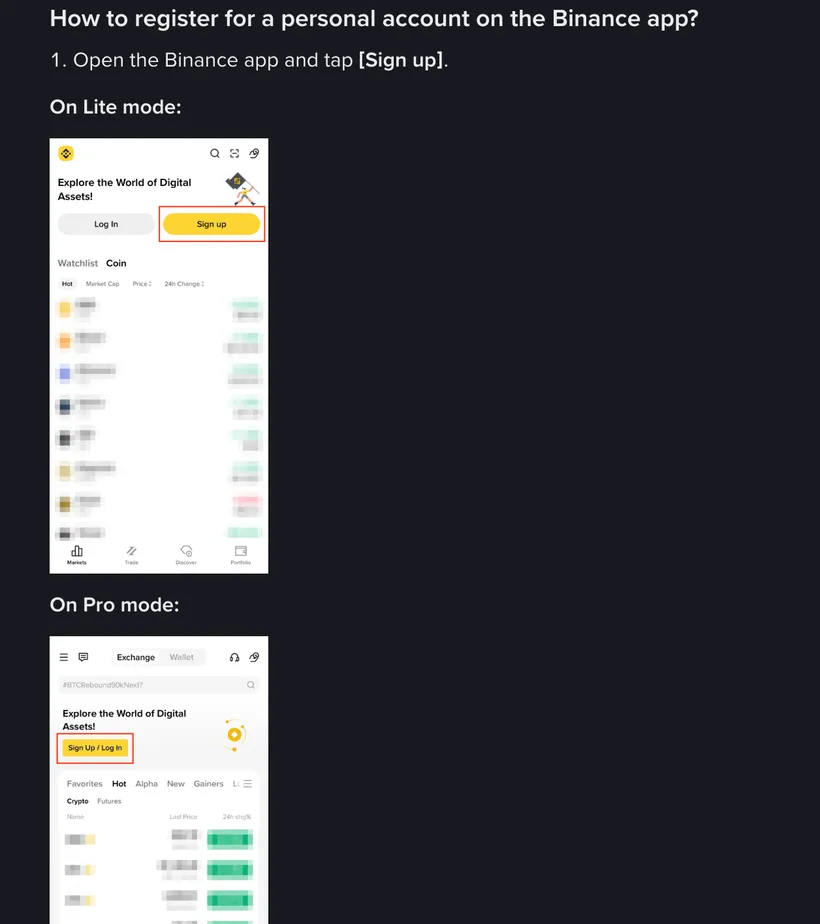
The app's screens and order may differ slightly from the website; just follow the prompts in front of you.
Where the referral code BN5262 goes, and what it's for
Toward the end of registration you'll see a field labeled "referral code" or "Referral ID." Many beginners skip past without noticing — but this field is genuinely in your interest.
The code's purpose is simple: enter a valid referral code at sign-up and you get a certain fee discount on your later trading. Entering it is free; later trades are charged at the discounted fee. Our referral code is BN5262 — just type it into that field.
The exact discount percentage and the form of the promotion follow Binance's current rules; we don't charge you anything extra. We only tell you about a code that benefits you — whether to use it and how much it saves are ultimately set by the platform. For how fees are calculated, how much the code can save, and whether you can add it after registering, we wrote a dedicated piece, the referral code and fees explained, if you care about this part.
How to turn on 2FA on Binance
Many people register successfully and dash off to watch prices — let me grab you here: the first thing you should actually do after registering is turn on two-factor authentication (2FA). Its importance even outranks which coin you buy.
What is 2FA? An analogy: your password is the lock on your front door, and 2FA is a chain bolt added behind it. Even if someone steals your password, without the rotating code on your phone they still can't get in. Turning it on blocks the vast majority of account theft.
How to turn it on
- After logging in, go to your account's "Security settings."
- Find "Authenticator app (Authenticator)" and prefer it — it's steadier than SMS verification (SMS can be hijacked / SIM-swapped).
- Install an authenticator app on your phone and scan the QR code on the page to bind it.
- Write down the backup key shown during binding and store it offline. If you ever lose your phone, that's what lets you recover — don't skip this step.
As soon as the account exists, go into security settings, bind the authenticator and write the backup key down offline before you do anything else.
Code won't arrive, can't register — what to do
When sign-up stalls, it's almost always one of these three. Check them one by one:
Verification code not arriving
- Email code: check your spam folder first — platform emails often get misfiled there.
- Wait a minute or two before clicking "resend"; don't hammer it — frequent requests can get you temporarily rate-limited by the system.
- SMS code slow to come: check signal and whether unknown texts are blocked; if all else fails, switching to email registration is often steadier.
Prompt says "this account already exists"
It means this email or phone was registered before (possibly by you, forgotten). In that case, don't re-register — just use the "forgot password / log in" flow to get into the original account.
Page won't open, stuck on verification
Usually a network or browser-cache issue. Switch browsers, clear the cache, or try the official app — it often goes through. If the slider check keeps failing, slow down and line up the gap before dragging.
Registering ≠ verifying — don't confuse them
This is what beginners most easily mix up: registration and ID verification are two different things. Registration just gives you an account you can log into; but to actually buy, sell, deposit and withdraw, a legitimate platform also requires ID verification (KYC) — submitting your ID document and passing a face scan. On Binance specifically, a new account can't deposit or trade until it completes standard verification.
This piece is only responsible for "getting your account open." What verification needs, the steps, how long, whether it's safe, whether privacy is a worry — that's a complete topic of its own, which we wrote in the full guide to KYC verification. We suggest setting up your account and 2FA per this piece first, then moving on to the verification piece, one step at a time, so nothing gets muddled.
A few common beginner questions
Does registering cost money?
No. Opening an account is free. And registering doesn't mean you have to buy — you can open an account and slowly get familiar with the interface against a guide. Money only enters the picture later, with depositing and trading.
Do I have to enter a referral code? Can I register without it?
You can register. The referral code isn't required, and you can leave it blank. But entering a valid code (like our BN5262) gets you a fee discount. The exact discount follows Binance's official rules.
Can I change my password or bind a phone after registering?
Yes. After logging in, you can change your password, add a phone or email, and adjust 2FA methods anytime in account security settings. The fuller your account's security settings, the better — patch them up when you have a moment.
Once I register, do I have to buy crypto right away?
Not at all. Registering and buying are two separate things, and leaving an account open carries no fee. We suggest registering, verifying, and turning on 2FA, then getting familiar with the interface and reading your first buy clearly — when you do want to act, test small. Much steadier.
What to do after registering
Get the account built and 2FA on, enter code BN5262 along the way to claim the discount*, then slowly learn how to verify and how to buy. Registration is free, so you can open one now and learn against it.
*Fee discount follows Binance's current promotion rules; we never charge you anything extra. We are not Binance's official website; crypto prices are highly volatile — only invest what you can afford to lose.
KYC verification, explained
Account open? Next is verification. What to prepare, the steps, and whether it's safe — explained.
Referral code and fees
How much can code BN5262 save, where do you enter it, can you add it after registering? Explained in one go.
How to withdraw from Binance
How do you safely get your money back? The two routes, getting the network right, and common reasons it gets stuck.