What Binance KYC asks for, and how to do it safely
Binance ID verification needs three things: a valid ID document, one face scan, and a few basic details that match that document exactly. Do it in the official app or on the official site from your own bookmark, and your materials go into Binance's verification flow; the real risk is sending your ID or codes to "support" outside that flow.
What does KYC mean?
KYC is the abbreviation of "know your customer." Plainly, it's the platform confirming one thing before you formally trade: that the person operating this account is really you. The method is to ask you to submit an ID document and do a face scan, matching the "account" to a "real person."
You're actually no stranger to this. Open a bank account and you bring your ID, show up in person, sometimes get photographed. Open a brokerage account and you upload ID and do a video check. KYC is that same flow you've long been used to, moved onto crypto exchanges. It's not some quirk unique to crypto — it's standard practice across global finance.
Why an exchange must verify
You might think: can't I skip verifying? Such a hassle. There are a few unavoidable reasons behind it, and understanding them, you won't see it as arbitrary.
1. It's a hard regulatory requirement
For platforms handling money, regulators broadly require "anti-money-laundering" and "know your customer" compliance work, so that exchanges don't become conduits for laundering, fraud or financing crime. A legitimate big platform that wants to operate legally in many countries must obey these rules, and ID verification is the most basic part.
2. It actually protects you too
Verification isn't only the platform's obligation; it benefits you concretely. If your account ever hits a problem — theft, an abnormal login, needing to appeal to recover it — your verification details are the strongest evidence that "this account really is mine." An account with no verification, that anyone could register identically, is one you'd struggle to prove is yours if something went wrong.
3. Flipping it around makes it clearest
Turn it over and you'll feel steadier: a platform that requires no verification and lets you move large amounts right after registering is the one to be more wary of. The more a small platform wants to do shadowy things, the less it dares to touch the verification line. So "whether it requires verification" is often a touchstone for how legitimate a platform is. The premise, of course, is using a large, regulated platform with the most users; handing your ID to an unheard-of small exchange is where the real risk lies.
To judge whether an exchange is trustworthy, "does it require verification" often says more than "how low are its fees." A platform that has you verify when it should is normal; one that skips all verification yet eagerly pulls you into large trades is the one to be more cautious about.
What documents to prepare
Verification doesn't need much; prepare it in advance and you'll generally pass in one go. Usually just these:
- A valid government ID document of yours: ID card, passport, driver's license, etc., photographed clearly per the platform's instructions, both sides where required, with details legible, no glare, no missing corners.
- One face scan (liveness check): blink, turn your head, open your mouth as the screen prompts, proving it's really you, live, not a photo held up — a few seconds.
- Some basic info: name, date of birth, nationality, etc., entered to match your ID exactly — a single character off can snag it.
One reminder: start all of this yourself, from an official entry point — the official app, or the official site opened from a bookmark you saved. The web version works too, and being redirected to Binance's contracted verification provider is part of the official flow. A legitimate platform runs verification inside its own flow and will never have you send ID photos to some "support" via chat apps, email or a third-party website. This point is crucial, and we'll expand on it below.
Roughly how many steps, how long
The whole verification flow isn't complex for a beginner; roughly it goes:
- After logging in, enter the "Identity verification / KYC" entry in your account.
- Choose your document type and upload or capture the document as prompted.
- Fill in the required basic info, matching the document.
- Complete a face scan / liveness check.
- Submit and wait for system or manual review; once passed, your account unlocks the corresponding functions.
On Binance that means a new account can't deposit or trade until standard verification is done, and older accounts that never verified are limited to withdrawals.
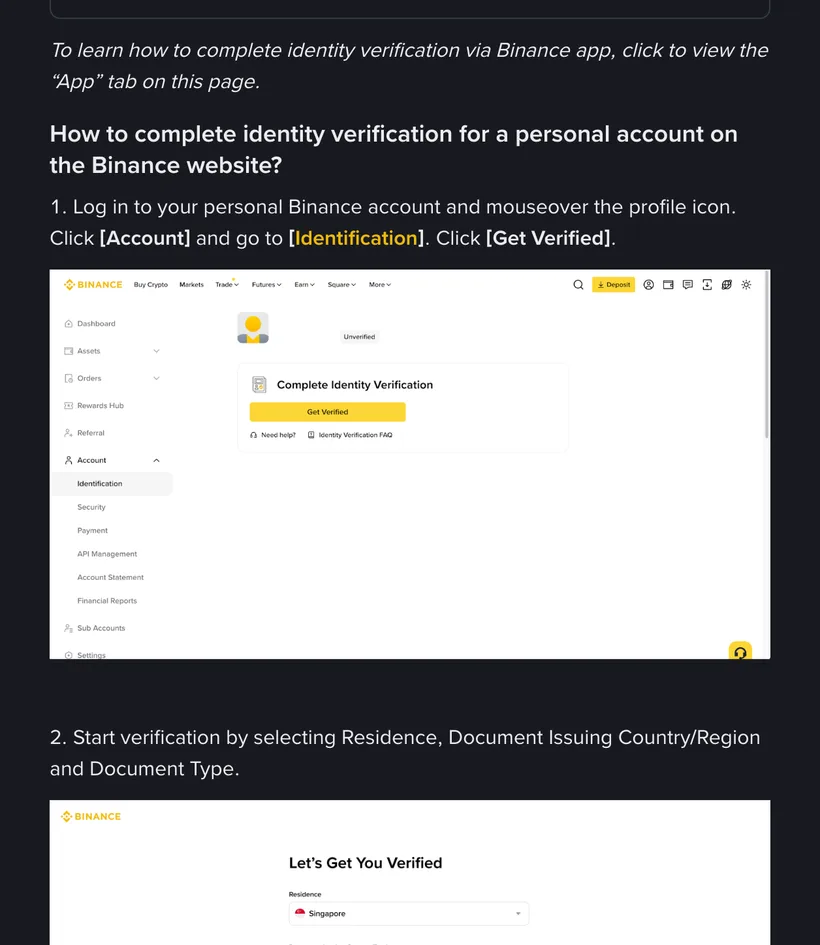
Binance's help center says identity verification is usually reviewed within 48 hours; manual review or busy periods can take longer. Go by the progress prompt on screen, and don't keep resubmitting while you wait.
Is verification really safe
This is the question that pokes a beginner's heart hardest: handing over my ID — safe? Two layers will give you a clear take.
Done on a legitimate big platform, it's routine and necessary
To operate legally across countries, big platforms typically pour heavy resources into data security, encrypted storage and access controls, treating users' identity materials as highly sensitive. Completing verification on such a platform is, in essence, no different from leaving your identity details with a bank or brokerage — routine compliance. What's truly dangerous was never the act of "verifying" itself, but who you handed your materials to.
What you should actually worry about is giving materials to the wrong person
The risk point is crystal clear: not "going through verification properly in the official flow," but someone sending ID photos and codes to an impersonator platform, fake support, an unclear link or a private individual. The former is a legitimate flow; the latter is where accidents breed. So the right way to ask "is verification safe" is: did I only complete it through an official channel? Sticking to official channels shuts out the accident beginners run into most — being talked out of your documents and codes by a cloned site or a fake support agent. What it doesn't buy you is a promise that your data can never be exposed: the platform's own data-security risk is real, and so are the situations where regulation requires it to retain your details and share them with authorities. No point pretending otherwise. And once you hand materials to someone outside the platform, that's a different story altogether — no legitimate platform can save you there.
Common reasons it fails
Not passing on the first try is normal, mostly small issues that check out with a comparison:
- Blurry photo: glare, blur, dim light, or the document not fully in frame. Re-shoot somewhere bright, flat and aligned.
- Info mismatch: the name or birthdate you entered doesn't match the document — even one character or punctuation mark off can bounce it. Check word for word and re-submit.
- Face scan failed: moved too fast, expression not right, wore something covering. Take off mask and hat, follow the prompts slowly.
- Unsupported document: you used a document type the platform doesn't accept; switch to a valid one it lists and try again.
If it keeps failing, don't panic, and don't go online looking for some "pass-KYC-for-you" service (these are scams or ways to steal your documents). Consult the platform's official help docs, or ask through its official support channel, reached from the entry you opened yourself. Remember, real support only appears through official channels, will never add you privately, and will certainly never ask you for your documents or codes.
How is your ID data protected after you submit it?
Worrying about privacy is entirely reasonable; these points help you gauge it:
- Verification details are sensitive data; legitimate platforms have an obligation, and usually the capacity, to keep them properly — but that doesn't mean you can be careless.
- What you can do is hand verification only to the big platform's official channel, never submitting it through any third party or "agent." That's the most important line on your end.
- Your account's own security has to keep up too: strong password, 2FA on, don't click strange links, never give anyone a verification code. However well your materials are protected, if you carelessly lose the account yourself, it's for nothing.
- You don't have to take anyone's word for any of this — you can check it yourself. Binance's own site has a Privacy Portal entry, and inside it you'll find the privacy notice that applies to your region and which entity you're actually contracting with, which third parties process your data, and how to file an access or deletion request. These documents get revised, so go by whichever version is live on the day you look.
Ultimately, privacy safety is a two-ended thing: "platform safekeeping" plus "your own care." On the platform side, picking the right big platform covers most of it; on your side, holding the line of "operate only through official channels" pushes the risk very low.
One scam-safety line you can't break
Scams built around "ID verification" are everywhere, in countless variations, but they all serve one purpose: tricking you into handing over sensitive info or assets. Carve the line below into your head and you'll block the vast majority:
Common scams, for instance: someone posing as "support" says your account verification is abnormal and they'll help check it, getting you to read out a code; or they send a link that looks a lot like the official site, luring you to upload documents on a fake page. These tricks share the same lineage as the rest of crypto fraud. What each of them looks like in full is laid out in the 8 crypto scams.
Verification typically runs like this: go in through the official app, or the official site from a bookmark you saved, find the identity-verification entry, choose the document type, photograph the document, fill in the basic info, do the face scan — all inside that one official flow you opened yourself (the check itself may be handed to a provider Binance has contracted, so the page redirecting is normal), with no step requiring you to send materials to anyone. If a face scan fails because the light is dim, redoing it by a window usually passes.
As long as your materials are ready and you stayed inside the official flow you opened yourself, verification itself isn't scary — what to always guard against is "someone having you send materials outside that flow."
Verification is standard for a legitimate platform — pick the platform first
Whether verification is safe hinges on who you hand your materials to. Pick the most-used, regulated big platform first, get your account open, then start verification yourself from an official entry point — the steadiest order. Registration is free.
We are not Binance's official website. Only ever start verification from an entry you opened yourself — the official app, or the official site from your own bookmark; any "support" asking for your documents or codes is committing fraud.
How to register on Binance
Verification comes after registering. No account yet? Read this first — from the official entry point to turning on 2FA.
The 8 crypto scams
How do fake support and fake verification links trick you into handing over materials? Learn the full set, and verification becomes truly safe.
Wallets, keys, seed phrases
Account safety isn't only verification. Private keys and seed phrases — concepts that, once leaked, can't be recovered — must be grasped first.